
Are you looking for DGPS Gazette Status? In Maharashtra, for a name change, correction of date of birth, or change of religion, official documentation may be required. Published through the Directorate of Government Printing, Stationery and Publications (DGPS), Maharashtra Government Gazette notification, or DGPS Gazette establishes such changes.
DGPS Gazette Status
After submitting an application, applicants often want to know if it has been approved or where can they do DGPS Maharashtra gazette download PDF. Its DGPS Gazette status allows them to track their applications and access the published notification online.
I will today share an in-depth guide here from which you can learn the right steps to check DGPS Maharashtra gov in Gazette status and DGPS Maharashtra Gazette download.
What is DGPS Maharashtra Gazette?
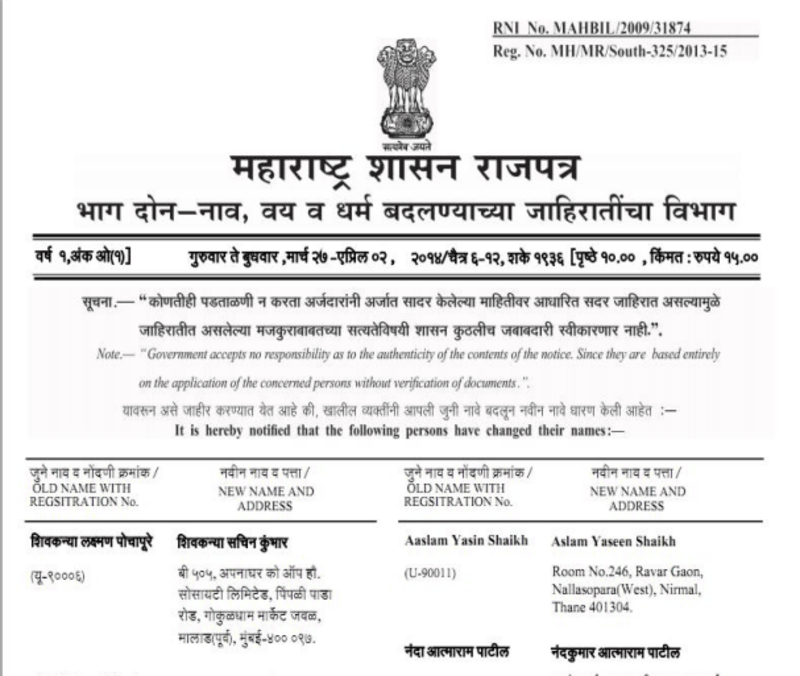
The full form of DGPS is the Directorate of Government Printing, Stationery and Publications, Government of Maharashtra. For publishing the Maharashtra Government Gazette, it is generally responsible. It usually contains official government notifications and public notices.
To publish some of these changes, people can use Part II of the Maharashtra Government Gazette:
- Change of name or surname
- Change in date of birth or age
- Change of religion
- Miscellaneous notices and advertisements
For those unaware, it is public proof that the declared change has been published. When requesting updates to personal records, it can be submitted to authorities.
For example, when updating documents with a bank, passport office, etc., someone who changes their surname after marriage may need a Gazette notification.
What Does DGPS Gazette Status Mean?
DGPS Maharashtra gov in Gazette status is the current progress of a Maharashtra Government Gazette application.
After submitting the online application and completing the payment process, to check the status, you can use your Applicant ID or Registration Number. Based on the department’s decision, the application may be under processing, approved, or rejected.
When an application is accepted and the notification is published, you can access the View Gazette option and download the DGPS Maharashtra Gazette.
Remember that application approval and final notification publication are different stages. Apart from the payment receipt or application acknowledgement, the applicant should retain the published Gazette as proof of publication.
DGPS Maharashtra Gov In Gazette Status Online
Through the official DGPS website, applicants can check their application progress. But they must follow these steps:
- First, you should visit the official website, i.e., https://dgps.maharashtra.gov.in/
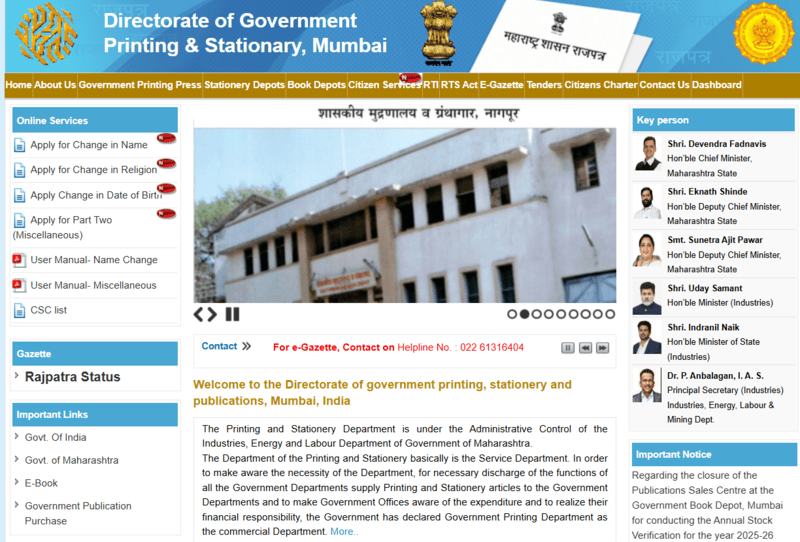
2. After that, you must find the Rajpatra or Gazette status on the left side.
3. After that, you should select the relevant service like Change in Name, Date of Birth, or Religion.
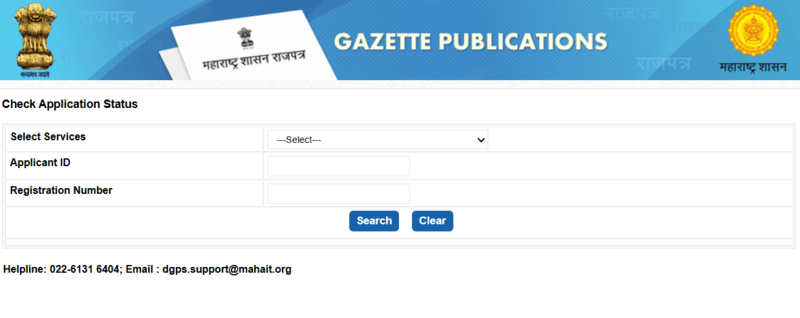 4. In the next field, you must enter your Applicant ID or Registration Number.
5. You should then complete the verification shown on the website.
6. Lastly, you should submit the details to view your DGPS Gazette status.
The portal will now show the available information related to your application.
If you applied for a name change, instead of opting for an incorrect section, ensure you select the relevant name-change service
When checking the DGPS Maharashtra gov in Gazette status, you should keep your application acknowledgement or registration details safe because they are important.
DGPS Maharashtra Gazette Download PDF
Once the notification has been published, you can then download the Gazette PDF online. For the same, follow these steps:
- First, you should visit the official DGPS Maharashtra website.
- Then, you should open the Rajpatra section.
- For your application, you should select the appropriate service.
- Enter your Applicant ID or Registration Number after that.
- Find the View Gazette link.
- To open the published notification, click on the link.
- Save and do DGPS Maharashtra gazette download pdf at last.
After the publication details are issued, the View Gazette option can only be available. If you cannot see this option, it is best to check whether your application has reached the publication stage.
Suppose you wish to use it in the future. In that case, you should keep a digital copy of the downloaded document and print the same.
DGPS Maharashtra Gazette Download PDF without Application ID
Applicants who want to search an already published notification can also use the view Gazette facility.
When you want to search a published Maharashtra Gazette issue, instead of tracking a person’s application, this option is useful. Its steps are:
1. First visit the official Maharashtra e-Gazette website.
2. Then it’s ideal to select View Gazettes.
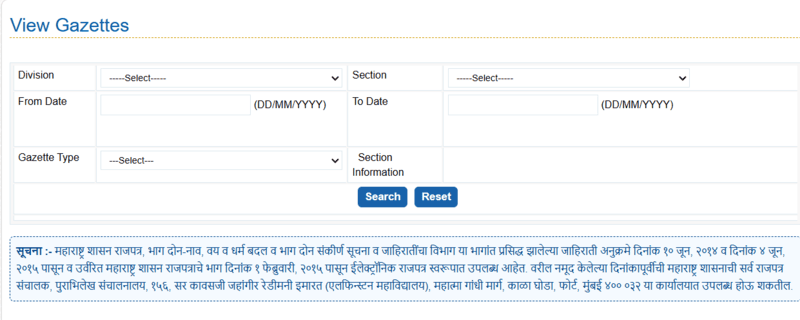
3. On the next window, you should opt for the relevant division from the available options.
4. Select the appropriate section, such as Part Two (Change in Name).
5. You should then enter the required From Date and To Date.
6. Where applicable, select the Gazette type like Ordinary or Extraordinary.
7. Submit the search details, then.
8. You must next browse the relevant issue and download the DGPS Maharashtra Gazette.
9. To narrow down your search, you can use the division, section, publication date, etc.
For name, age, and religion changes, you should only select the corresponding Part II section. If you select the wrong section, you may also prevent yourself from finding the right notification.
How long does DGPS take to publish a Gazette Notification?
As per the Maharashtra Directorate’s published service information, for a Part II Gazette application, the usual service period is 15 days.
Apart from changes in name, date of birth, and religion, the same period also applies to the relevant miscellaneous services. However, to prepare documents, complete an application, and receive the final published notification, the time required may differ.
The department also states that fast publication is not possible now because the Maharashtra Government Gazette is published weekly.
Therefore, when planning document updates, passport applications, or other official work, you should avoid depending on fast publication.
What to do if DGPS Gazette Status is not updating?
Applicants may sometimes not see a new status immediately after submitting their application. Consider the following tips then:
- Ensure you have entered the correct Applicant ID or Registration Number.
- As per your application, select the Change in Name, Date of Birth, or Religion.
- When an application is accepted or rejected, the department usually sends a message to the applicant’s registered numbers. So, you should check your phone’s SMS.
- 15 days is the common period for service. So you should wait and check again if the application is still within this period.
- If the situation persists, contact the e-Gazette support team at dgps.support@mahait.org or call 022 61316404.
If your application is rejected, before resubmitting it, you should check the provided reason.
FAQs to DGPS Gazette Status
1. How can I check DGPS Gazette status online?
For the same, you should first visit dgps.maharashtra.gov.in and open the Rajpatra Status section. Then select the relevant service and enter your Applicant ID or Registration Number to check the application details.
2. How can I download the DGPS Maharashtra Gazette PDF?
You should first open the Rajpatra Status page, select your application category, and enter the required identification details. After the notification is published, to open and download the PDF, click the View Gazette link.
3. How many days does a Maharashtra Gazette name change take?
For a Part II name-change notification, the department’s stated service period is 15 days. The actual time may depend on the application and publication process.
Conclusion
To track the publication request, the DGPS Maharashtra Gazette portal makes it easier. By using the Rajpatra Status, once it has been published, applicants can check their application details and download the Gazette PDF.