
Are you waiting to Gazette download after applying for the same? After your name change notice is published, you can download its official PDF from the Government of India’s e-Gazette portal.
This post is going to teach you the steps for downloading the Gazette notification once it has been published. If you are looking to apply for a Gazette or facing any kind of problem, then you can CONTACT US by sending WhatsApp message to us using the WhatsApp button added below the page.
Let us now discuss the process for Gazette Notification Download.
What Is Gazette Notification Download
Issued by the Government of India, it is an official government publication containing various notifications. You can find and download its PDF copy through the official E-Gazette portal.
The portal allows you to find the latest published government notifications. However, it is important to note that it is not for submitting a fresh name change application. Instead, it is meant for accessing published notifications.
Gazette Download: The Complete Process
Through the official e-Gazette portal, you can check Gazette status and download your published name change Gazette notification. To download and save it, follow these steps:
Step 1: Visit the Official e-Gazette Website
You must first open the official Government of India e-Gazette website at https://egazette.gov.in/.
The published issues of the Gazette of India are generally available here. Without going to a government office, you can access previous publications here and download the relevant Gazette PDF.
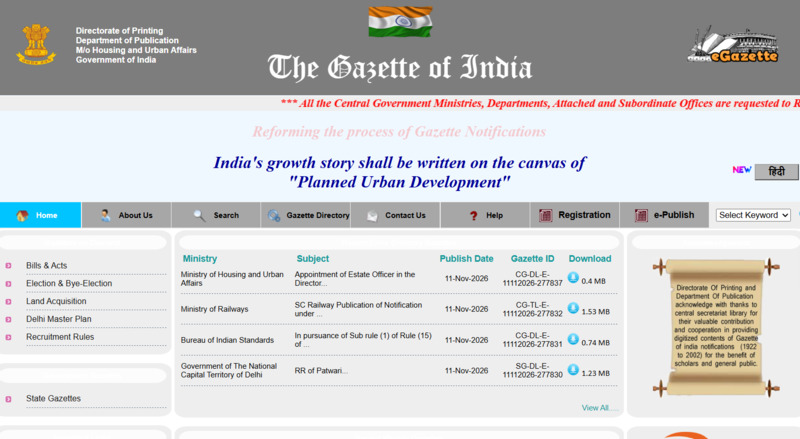
Step 2: Select the Search Gazette Option
After opening the portal, you should find the Search Gazette option on the homepage on your device.
Tap or click on it to access it where you can see the Gazette category, part, and publication date to find your name change notification.
To access an already published notification, there is no need to submit a fresh application.
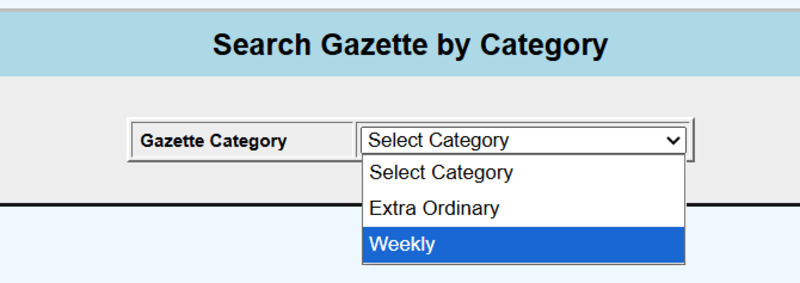
Step 3: Choose the Weekly Gazette Category
You must then select Weekly Gazette as the Gazette category. Under this category, you may access Name Change notifications commonly published. By selecting the correct category, you may find the relevant issue.
Before moving to the next step, you should ensure you have selected the right category.
Step 4: Select Part IV and Publication Date
From the available Gazette parts, you should select the Part IV section. Name Change notification here are commonly comes here.
When you expect your name change notification to have been published, you should select the relevant publication period or date as per your expectation. Before selecting the date range, you should check the expected publication date of your name change notification.
If you are not sure about the exact publication date, you should check the relevant Saturday dates covered by the weekly Gazette issues. Also, you must check more than one issue.
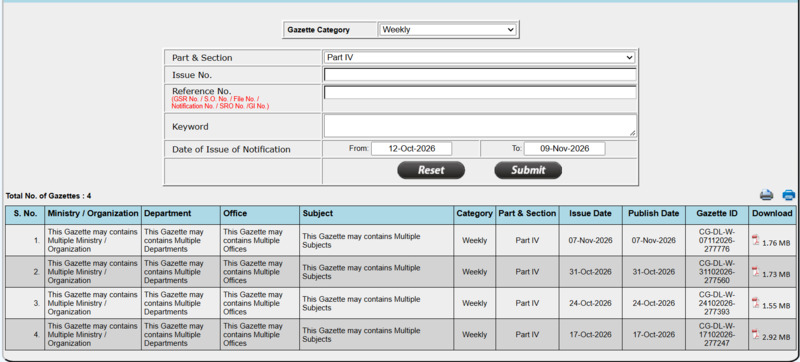
Step 5: Open and Gazette Download
To see the matching Gazette issue, you should then click or tap on the Standard Report button.
A link to the Gazette PDF will appear on your screen. You should open the PDF document and press Ctrl + F on your keyboard. In the document, you must enter your new name or the name mentioned in your notification
After you find your published name change notice, you can download and save the complete Gazette on your device.
When updating your name in Aadhaar, PAN, passport, bank accounts, etc., you should keep the downloaded PDF safe because you may need it.
What To Do If You Do Not Find Your Name?
Even after selecting the Weekly Gazette and Part IV options, applicants sometimes cannot find their name. Several reasons may be there behind this problem. Common reasons are:
- You may have selected the wrong publication date in which your name is not included.
- Your application may also still be in process.
- You should check if you are searching using the exact name mentioned in your application.
- You may be seeing the wrong Gazette notification.
Before assuming that your application is rejected, you should check your application and publication details.
What to Do After Gazette Notification Download
After performing the Gazette Notification Download, you can start using it to update your other official records. Common documents to update with this document are:
- Aadhaar Card: Submit the Gazette notification along with other supporting documents that UIDAI asks for
- PAN Card: Using the appropriate process, apply for correction in your PAN card with Gazette and other supporting documents
- Passport: Submit the required documents to the concerned authority for the same.
- Bank Account: Reach your bank branch and follow their process there.
- Educational records: For changing your name, you should approach your school, college, or university. You must ask for the exact process to update your name in their records there.
- Employment records: You should submit your supporting documents to your employer’s HR department.
Remember that every department or institution have their own requirements to update your name within your records. You should therefore contact them to know the exact process.
Gazette Download does not automatically update your name in all government or private records. After getting the notification, you should contact their departments.
FAQs
1. How can I download my Gazette notification online?
For Gazette download, you should first visit egazette.gov.in. After that, you need to select Search Gazette, Weekly Gazette, Part IV and the relevant publication dates. Open the standard report on your device. In the report, you should find your name and download the Gazette issue.
2. Where can I find my name change Gazette notification?
On the official Government of India E-Gazette portal, you can find your published Central Gazette name change notification.
3. How many days does it take for a Gazette notification to be published?
Although there is no fixed timeline in the Department of Publication guidelines, it could take around four to eight weeks. The exact time depends on your documents, verification requirements, and publication schedule.
4. Can I download my Gazette notification using my application number?
No, there is no application-number-based search facility available on the official Government of India E-Gazette portal. You should instead use the Gazette category, part, and publication dates to find the publication here.
5. Is the E-Gazette PDF valid for updating Aadhaar and PAN?
Yes, it can be used as supporting proof for a name change. However, Aadhaar and PAN Card authorities have their own requirements. Apart from the Gazette notification, you may also need to submit other documents as per the concerned authority.
Conclusion
Once your name change notification is published, the process to Gazette Download is simple and easy. You should visit the official E-Gazette portal, select Search Gazette, Weekly Gazette and Part IV, and enter the relevant publication dates. After that, you can open the Standard Report, find your name, and perform the Gazette Notification Download.
You should keep the Gazette notification copy safe to use it later for updating your records. If you need any help in the process, feel free to contact us for any kind of assistance here through the WhatsApp button available below this page.