
It is important to find the e Gazette Gujarat to get official proof of publication to officially apply the change in others’ essential documents. Although it is readily available on the Gujarat government’s official e-Gazette website, the right steps are needed to find it easily.
You will then locate the notification without paying for access to a public document. Visiting the official portal is, however, more important to see recent and older Gazette issues.
We’ll today explain a detailed guide to accessing the Gujarat Gazette download PDF here.
What is e Gujarat Gazette?
It is an official government publication used to announce rules, departmental notifications, appointments, public notices, and individual name changes. Gazette publication becomes documentary proof of publication after a name-change Gazette is published.
The Government of Gujarat publishes its Gazette through its government printing and stationery department. Gujarat Gazette name change list lets you access official publications online
The published notification supports applications to update Aadhaar, PAN, passports, bank accounts, educational certificates, etc. Acceptance, meanwhile, depends on the concerned authority’s requirements.
The official e Gazette Gujarat is free to view & download. Although private documentation services may charge for preparing and filing an application, payment isn’t needed to access the public PDF.
How to Access e Gazette Gujarat?
Step 1: Open the official website
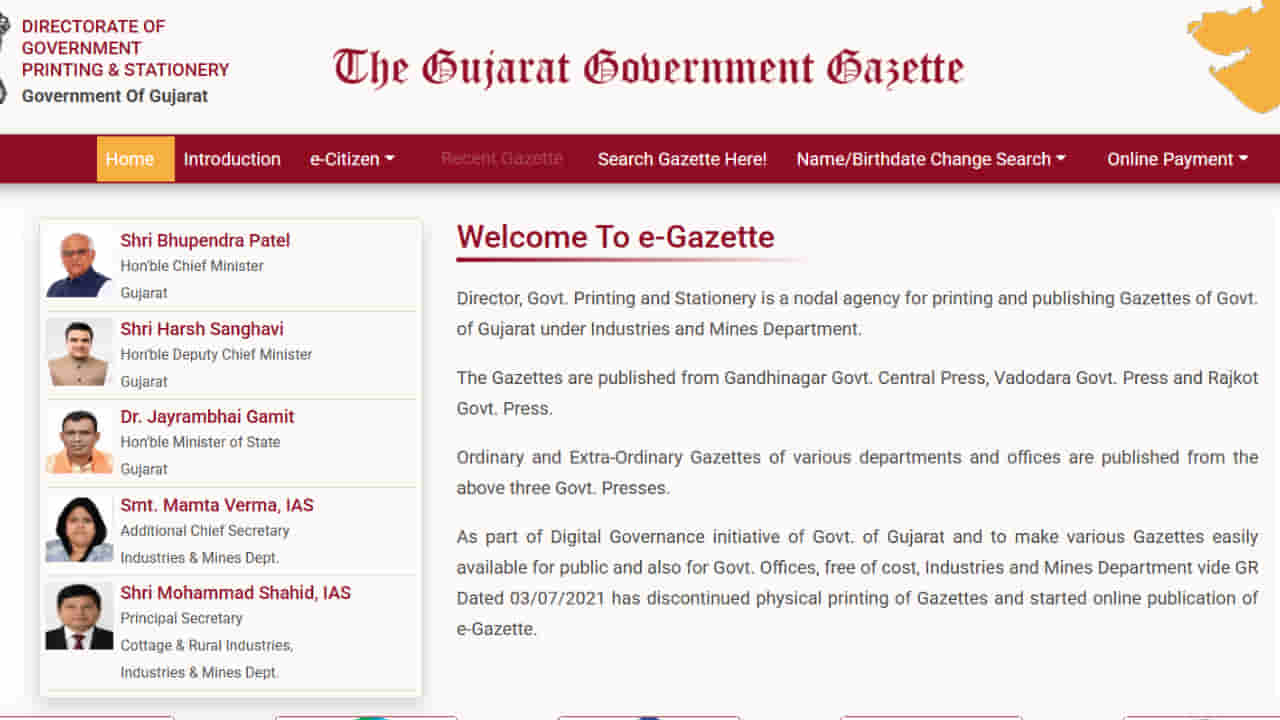
You must initially visit the official website, i.e, https://egazette.gujarat.gov.in. It’s best to confirm that the website ends with gov.in, as several fake websites are available on the internet.
Step 2: Select the appropriate search option
Although there are several options available on the website, you must select the “Recent Gazette” option to open the recently published issues. You can also open the “Search Gazette” option to see older Gazettes.
Step 3: Enter the available details
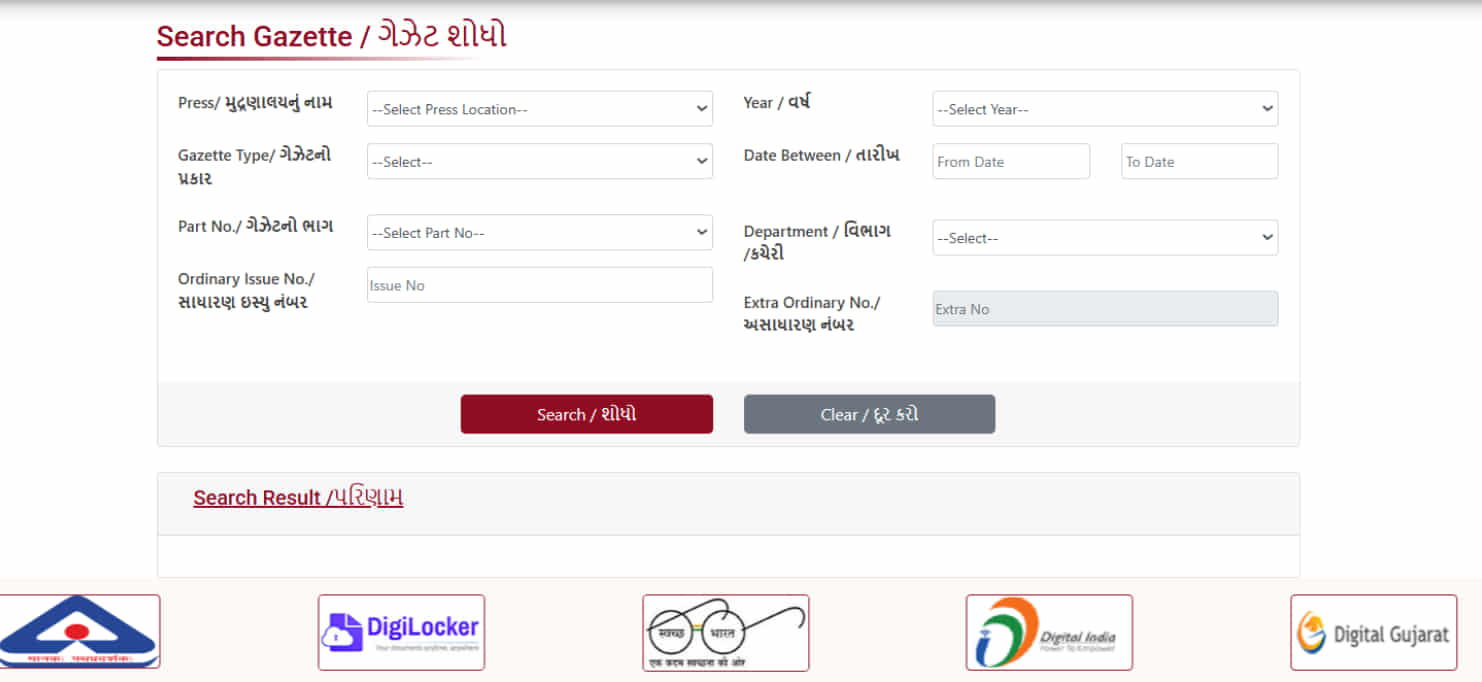
Although the Recent Gazette option offers the Gujarat Gazette name change list, the printing press, Gazette type, part number, issue number, year, date range, and department must be filled in the “Search Gazette Here” option. You don’t need to complete every field if the available details are sufficient to find the problem.
Step 4: Search for the required publication
You can then submit the search and review the results. The matching Gazette issue must be selected to open its PDF.
Step 5: Find your notification
You must then use the search function in your browser or PDF reader after opening the document. Press Ctrl + F to search for your name on your computer to find your entry. Try a shorter part if the complete name doesn’t give the result.
It’s also best to check the spelling, publication date, and issue details before relying on the document.
Gujarat Gazette download PDF: Steps to Save Your Document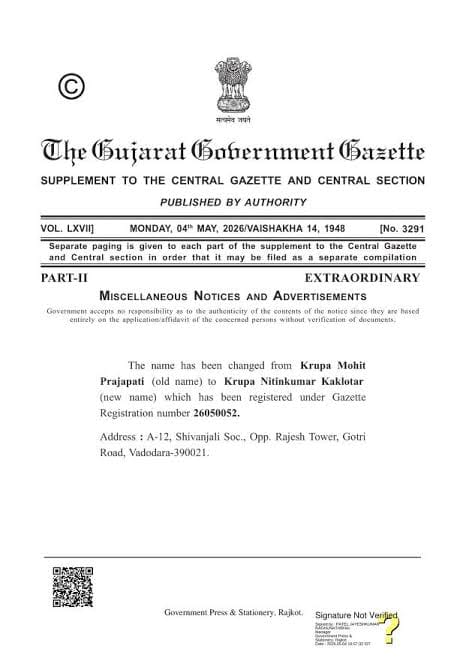
Follow these steps to save the e Gazette Gujarat’s usable copy after finding the correct issue:
- You must first open the Gazette issue containing your notification.
- You can either use the Download button if available or use the PDF reader’s download option.
- Taking a screenshot won’t be enough for future use. It would therefore be best to save the complete PDF.
- You must then store the publication date, issue number, and page containing your notification.
- It’s best to keep the unedited and original file in a safe location.
- You should also save the backup on another device, in your email, or in a cloud service.
You can also print the Gujarat Gazette download PDF if you want a printed copy. Keep the original document as well because some authorities may ask for the digital copy.
If the PDF copy doesn’t open, it’s also best to download it instead of viewing it directly in your browser. You may also try using another browser or PDF reader.
How to Find Gujarat Gazette Name Change List?
People looking for a Gujarat Gazette name change list usually want to find a published name-change notification instead of reading an entire Gazette.
They must open the official portal and select Recent Gazette or the Gazette search option. Opt for the relevant issue using the available publication details. Then open the PDF on your preferred device and search for your old name or new name. Try alternative spellings or a shorter name fragment if the notification doesn’t appear in the first search.
A single Gazette usually contains multiple notifications. This is why finding the right issue doesn’t automatically mean that you’ve found your entry. The actual notification text must be checked before saving the documents.
Enter the application number or registered mobile number, and submit the search. Inward, Verification, Approve/Return, or Published may be shown in the result.
It’s best to read the remark to understand what needs correction if the status is Return. You must otherwise search the relevant Gazette issues to download the notification if your status is Published.
Gujarat State Gazette vs Central Gazette: Which Should You Choose?
It’s important to check whether the Gujarat State Gazette or Central Gazette is suitable for your requirements before applying for a name change. Although the Gujarat State Gazette may meet some state-level requirements, the Central Gazette follows its own application requirements.
The Central Gazette is, however, applicable for nationwide use. This is why it is recommended. The ultimate choice, meanwhile, depends on your specific requirements.
2 identity documents of the old name may be required for the Central Gazette. Obtaining 2 IDs may therefore be difficult if you publish your name change in the State Gazette and update your identity documents first. This could hence create complications for getting a Central Gazette publication.
Read more: Name Change Affidavit Format (Original): Complete Guide
Gazette notification for name change in Rajasthan (3 Steps)
Maharashtra Gazette Name Change: Step-by-Step Guide
FAQs to e Gazette Gujarat
1. How can I download the Gujarat Gazette PDF?
Visit the official eGazette portal initially to access e Gazette Gujarat. You must then open the Recent Gazette for recent publications or use the Gazette search option to find older issues. The relevant issue must then be selected & downloaded as a complete PDF.
2. Is e Gazette Gujarat free to download?
Yes, there is no charge to view and download published Gazette issues.
3. Can I apply for the Central Gazette after using the Gujarat State Gazette?
Yes, you may apply for the Central Gazette even after obtaining the e Gazette Gujarat.
Need Help With Gazette Application?
You can, however, contact us if you face difficulties with your application. Our team will guide you with the best possible steps to solve any error.